


- A job requisition is a formal request to hire a new employee or replace an existing one.
- It ensures hiring aligns with approved budgets, workforce plans, and business needs.
- A standard job requisition includes details such as job title, department, hiring reason, salary range, required skills, and approval workflow.
- Automating the requisition process reduces approval delays, improves compliance, and provides a complete audit trail.
- Modern HR teams use job requisition management software to streamline approvals, improve visibility, and accelerate hiring.
Most companies lose 5–10 days of hiring time before a single candidate is contacted — not because sourcing is slow, but because the job requisition is stuck in an email chain waiting for approval. A job requisition is a formal internal document submitted by a hiring manager to HR and Finance to request permission to open or fill a position. It is the official starting point of every hire.
This guide covers everything HR managers, recruiters, and hiring managers need to know about the job requisition process: what it is, what it includes, how it differs from a job description and a job posting, how the approval workflow runs step by step, and how to automate the entire process inside Microsoft 365 using Recruitment Management 365 (RM365) by Apps365.
What Is a Job Requisition?
A job requisition — often called a Job Requisition or hire request — is the internal document that formally authorizes the recruitment process to begin. It is submitted by the hiring manager, reviewed by Finance and HR, and approved before any sourcing, interviewing, or offer activity takes place.
The job requisition exists to protect the organization. It creates a paper trail that ties every new hire to an approved headcount plan, an approved budget, and a defined business need. Without it, organizations risk hiring outside their financial plan, duplicating roles, or opening positions that do not have a clear business case.
What a Job Requisition Is NOT
Three documents are routinely mixed up in hiring. Each serves a completely different function:
Document | Audience | Purpose |
Job Requisition | Internal — HR, Finance, Leadership | Approves the decision to hire. Controls budget and headcount. |
Job Description | Internal — HR and Hiring Manager | Defines the role: responsibilities, skills, experience required. |
Job Posting | External — Candidates | Advertises the open role. Drives applications from job boards and career sites. |
The job requisition is created first. The job description is written after the req is approved. The job posting comes last — and is based on the job description. Skipping the requisition step and going straight to a posting is one of the most common causes of unauthorized hires and budget overruns.
✅ Using spreadsheets to track Job Requisition and approvals?
RM365 gives you a purpose-built job requisition form inside Microsoft 365 — with multi-level approval routing, real-time status visibility, and automatic ATS activation on approval.
What Does a Job Requisition Include?
A well-structured job requisition form captures all the information HR, Finance, and leadership need to make an approval decision quickly. Missing fields are the most common reason reqs get delayed or rejected.
Below are the 14 standard fields every job req should include:
- Role Title: The exact job title being requested — must match the approved job architecture or compensation grade structure.
- Department / Business Unit: Identifies which team is making the request and which budget is responsible.
- Hiring Manager: The person accountable for the role — also the primary approver contact if questions arise during review.
- Reason for Hire: New headcount, backfill for a departing employee, or conversion from contract to permanent employment.
- Employment Type: Full-time, part-time, fixed-term contract, or freelance/contractor.
- Work Location: On-site, remote, or hybrid — and the specific office or region if applicable.
- Target Start Date: Helps Finance and HR plan onboarding resources and manage payroll timing.
- Compensation Range / Salary Band: Required for budget approval and — in 13 US states — legally required on the public job posting. More on this below.
- Cost Centre / Budget Code: Confirms the hire is funded and ties payroll to the correct department budget line.
- Number of Openings: Clarifies whether this is a single hire or a batch of openings for the same role.
- Reporting Structure: Who the new hire reports to, and whether they will manage other people.
- Business Justification: The case for why this hire is needed now — workload data, project requirements, or revenue impact. This is the field most hiring managers skip and the number-one reason reqs are rejected or delayed.
- Approval Chain: Lists the specific approvers required in sequence — manager, Finance, HR, and senior leadership if the role is above a defined salary threshold.
- Supporting Documents: Links or attachments such as an org chart, a workforce plan, or a budget approval from a previous period.
US Salary Transparency Laws: Thirteen US states — including California, New York and Colorado — now require employers to include a salary range on public job postings. The compensation range you enter in your job requisition is no longer just an internal budget detail. It flows directly to your external posting and must meet legal requirements before you publish. Getting the range right at the job req stage protects you from compliance exposure later.
Build your job requisition form once, use it every time.
RM365 includes fully customizable job requisition forms — including compensation range fields, cost centre codes, and approval routing built in from day one.
Job Requisition vs Job Description vs Job Posting — Key Differences Explained
Because these three documents are created in the same hiring process, they are often conflated — even by experienced HR professionals. Understanding where each document starts and ends is critical for process design and for training hiring managers.
Job Requisition — The Internal Authorization
The job requisition is a governance document. Its purpose is to get permission to hire. It is submitted before any role work begins and reviewed by Finance and HR before it goes further. The audience is entirely internal: the hiring manager who submits it, the Finance partner who reviews the budget, and the HR business partner or CHRO who signs off on headcount.
The job req answers one question: Should we open this role? Once approved, the answer is yes — and the hiring process moves forward.
Job Description — The Internal Role Specification
The job description is written after the job requisition is approved. It is an internal document that defines what the role does, what skills and experience the successful candidate needs, how success will be measured, and who the role interacts with. The job description is shared with the recruiter, used in interviews, and forms the basis of the compensation review.
The job description answers one question: What is this role? It is not written for candidates — it is written for the hiring team.
Job Posting — The External Candidate-Facing Advertisement
The job posting is derived from the job description but written for a public audience. It is shorter, benefit-forward, and written to attract applications. It includes only the information a candidate needs to decide whether to apply — role overview, key responsibilities, required qualifications, compensation range (where legally required), and how to apply.
The job posting answers one question: Why should a candidate want this job?
Dimension | Job Requisition | Job Description / Job Posting |
Created by | Hiring Manager | HR / Recruiter (job desc), Recruiter (posting) |
Reviewed by | Finance + HR + Leadership | HR / Hiring Manager (desc), Recruiter (posting) |
Audience | Internal only | Internal (desc) / External candidates (posting) |
Primary purpose | Budget and headcount approval | Role specification / Candidate attraction |
When it is created | Before recruitment begins | After req is approved |
Contains salary info? | Yes — internal budget range | Where legally required (posting) |
The Job Requisition Approval Process — Step by Step
The job requisition approval process is where most hiring delays originate. Understanding each step — and where things typically slow down — is the first step toward fixing them.
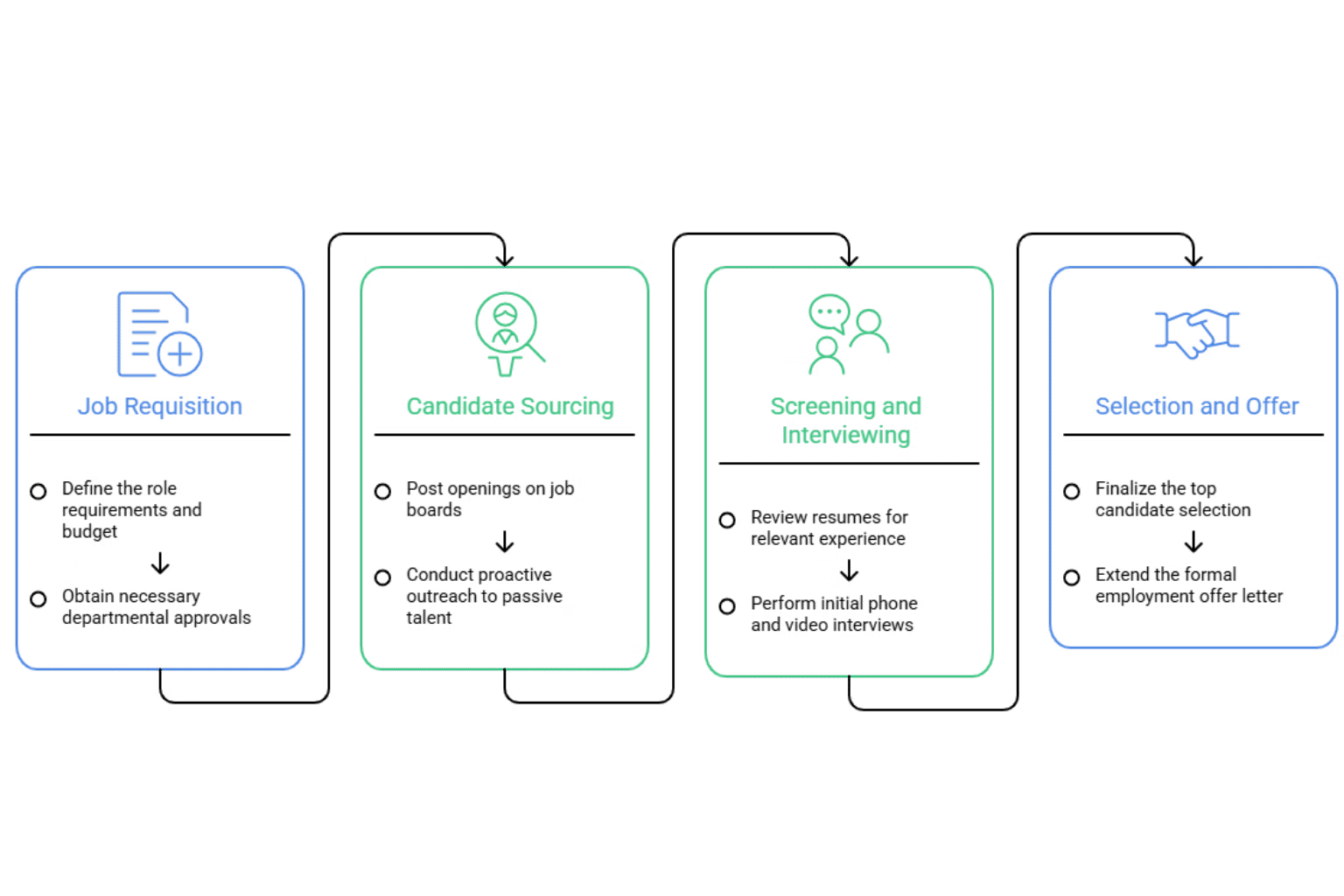
- Hiring manager identifies the need: A team member leaves, a project requires additional capacity, or a new function needs to be built. The hiring manager recognizes a staffing gap and decides to open a role.
- Job requisition form is completed: The hiring manager fills out the job req form — role title, business justification, compensation range, cost centre, and target start date. Incomplete forms are the leading cause of delays at Step 3.
- Req submitted for approval: The completed form is submitted to the approval chain. In email-based organizations, this means forwarding to a manager, then to Finance, then to HR — each as a separate action.
- Finance reviews budget availability: Finance checks whether the role is within the approved headcount plan and whether the compensation range fits the budget. If no headcount was pre-approved, Finance may request a business case review.
- HR reviews the headcount plan: HR validates that the role fits the current organizational structure, does not duplicate an existing role, and meets any internal job architecture requirements.
- Leadership sign-off (if above threshold): Most organizations require senior leadership approval for roles above a salary threshold — typically VP-level and above, or roles with a total compensation above a defined value.
- Requisition approved — req number assigned: Once all approvers have signed off, the requisition is approved and a unique req number is assigned. This number tracks the role through the ATS and connects the hire back to the approved req.
- Recruiter briefed: HR or the hiring manager briefs the assigned recruiter with the approved req details. This is the moment sourcing can actually begin.
- Job description written and reviewed: The recruiter and hiring manager write the job description based on the approved req. It goes through a brief internal review before the posting is created.
- Job posting goes live: The job posting is published to the career site and relevant job boards. The hire officially begins.
Common Bottlenecks in the Job Requisition Process
Most delays occur at Steps 3–6. The four most common causes are:
- No single place to submit: Reqs sent by email get lost in inboxes, replied to out of sequence, or approved without a record.
- Missing data on submission: Incomplete forms — especially missing business justification or cost centre codes — require the hiring manager to be chased before review can begin.
- No audit trail: When approval happens over email, there is no record of who approved what and when — creating risk during audits and disputes.
- No visibility on where the req is stuck: Hiring managers and HR cannot see whether the req is with Finance, waiting on a VP, or sitting unread in someone’s inbox.
Recruitment Management 365 routes job requisitions through your approval chain automatically — no email, no chasing. Hiring managers see exactly where their req is in real time.
How to Write a Job Requisition — With a Template
A strong job requisition does not need to be long. It needs to be complete. The goal is to give every approver to Finance, HR and leadership, exactly the information they need to say yes without asking follow-up questions.
Step-by-Step Guide to Writing a Job Requisition
- Start with the role title and department. Use the exact title from your approved job architecture. If the title does not exist yet, flag it — HR will need to create a grade before the req can be approved.
- State the reason for hire clearly. Choose from: new headcount, backfill, or contract conversion. If it is a backfill, name the person who left and when. Ambiguity here slows down Finance review.
- Specify employment type and work model. Full-time vs part-time and remote vs on-site vs hybrid. Include the location or region.
- Include the compensation range. Not a placeholder. If you are hiring in a salary transparency state, this range will appear on the public posting — so make sure it is approved and accurate before you submit.
- Write the business justification. This is the section most hiring managers skip — and it is the primary reason reqs get rejected or delayed. Include specific data: team size, current workload, project deadlines, or revenue impact. Two to three sentences of specifics are more persuasive than a paragraph of generalities.
- Attach supporting documents. Link to the org chart, the project brief, or the workforce plan. Approvers who can see the context approve faster.
- Set a realistic target start date. Work backwards from the start date to confirm the approval timeline, sourcing timeline, and offer timeline are achievable. Unrealistic dates create pressure that leads to poor hiring decisions.
Job Requisition Template — What It Includes
- Start with the role title and department. Use the exact title from your approved job architecture. If the title does not exist yet, flag it — HR will need to create a grade before the req can be approved.
- State the reason for hire clearly. Choose from: new headcount, backfill, or contract conversion. If it is a backfill, name the person who left and when. Ambiguity here slows down Finance review.
- Specify employment type and work model. Full-time vs part-time and remote vs on-site vs hybrid. Include the location or region.
- Include the compensation range. Not a placeholder. If you are hiring in a salary transparency state, this range will appear on the public posting — so make sure it is approved and accurate before you submit.
- Write the business justification. This is the section most hiring managers skip — and it is the primary reason reqs get rejected or delayed. Include specific data: team size, current workload, project deadlines, or revenue impact. Two to three sentences of specifics are more persuasive than a paragraph of generalities.
- Attach supporting documents. Link to the org chart, the project brief, or the workforce plan. Approvers who can see the context approve faster.
- Set a realistic target start date. Work backwards from the start date to confirm the approval timeline, sourcing timeline, and offer timeline are achievable. Unrealistic dates create pressure that leads to poor hiring decisions.
👉 use it directly inside Recruitment Management 365- customizable in minutes, no IT required.
How to Automate Job Requisition Approvals in Microsoft 365
Email-based job requisition approval is the single biggest cause of slow time-to-hire in organizations that already have good sourcing and interview processes. The sourcing is not slow. The interview scheduling is not slow. The bottleneck is the five-to-ten days between a hiring manager identifying a need and a recruiter being briefed to start looking.
Recruitment Management 365 (RM365) by Apps365 is built natively on Microsoft 365 — running inside Teams, SharePoint, and Outlook. It includes a built-in job requisition workflow that removes email from the approval process entirely.
Why Email-Based Approval Breaks Down
- No single submission point — reqs arrive in different formats to different inboxes.
- Approvers are not notified in a defined sequence — one person approves before another has seen the req.
- No SLA or escalation — a req can sit unread for days without any alert firing.
- No audit trail — when a dispute arises, there is no record of who approved what and when.
- No connection to the ATS — once approved, someone has to manually open the job in the recruiting system.
How Recruitment Management 365 Automates the Job Requisition Process — 3 Steps
- Hiring manager submits the req inside RM365. The form is built into the Microsoft 365 interface — accessible from Teams or SharePoint. No separate login. No new tool to learn. The hiring manager fills in all required fields, and the form validates that nothing is missing before submission.
- Power Automate triggers the approval chain automatically. On submission, RM365 triggers a Power Automate workflow that routes the req to Finance for budget review, then to HR for headcount validation, then to senior leadership if the role exceeds the defined compensation threshold. Each approver receives an Outlook notification with a direct link to review and approve. Response SLAs are enforced — if an approver does not act within the defined window, an escalation notification fires automatically.
- Approved req activates the job in the ATS automatically. Once all approvers have signed off, RM365 assigns a req number, creates the job record in the ATS, and sends a briefing notification to the assigned recruiter — all without manual intervention. The recruiter receives the full req details and can begin sourcing immediately.
📊 Teams using Recruitment Management 365 go from requisition submitted to recruiter briefed in under 24 hours — Apps365 customer data
This matters because time-to-fill is directly tied to when sourcing starts. Every day the req sits in an approval queue is a day the search does not begin. At a 5-to-10-day manual approval baseline, automating this step alone can cut weeks from total time-to-hire.
RM365 is available on Microsoft AppSource and the Azure Marketplace — Microsoft-vetted and deployable inside your existing Microsoft 365 tenant. SOC 2 Type II and ISO certified. GCC and GCC High compliant for US Federal teams. 12,100+ deployments across 172 countries. 14-day free trial, no credit card required.
Cut your job requisition approval time from days to hours.
RM365 runs inside the Microsoft 365 tools your team already uses. Set up your first automated job req workflow in under an hour.
No Credit Card Required
Job Requisition Best Practices
Following these six practices will reduce approval delays, improve compliance, and make the job requisition process a reliable foundation for every hire.
- Complete the business justification every time: A job req without a clear business case is a req that will be questioned at every approval stage. Even two or three sentences of specific data — headcount ratio, project deadline, revenue impact — increases approval speed significantly.
- Include the compensation range at submission: In 13 US states, salary range disclosure is a legal requirement on public job postings. The range on your job req must be approved before the posting goes live. Getting it right at submission protects the organization from compliance risk downstream.
- Set a 48-hour response SLA for approvers: Define how long each approver has to act and build in an escalation if the SLA is missed. Without a defined window, a req can sit at any approval stage indefinitely. Most organizations target 48 hours per stage.
- Use a centralized system, not email: Email provides no audit trail, no visibility, and no version control. A centralized job req system — whether purpose-built like RM365 or a well-structured SharePoint form — creates accountability at every step.
- Connect approved reqs directly to your ATS: When the approved req automatically creates a job record in your ATS, you eliminate manual data entry and the risk of a job opening that has no matching req on file. This is the connection that makes the entire process auditable.
- Review open reqs monthly: Stale reqs — roles that were opened but never filled — waste recruiter capacity and distort headcount plans. A monthly review of all open job requisitions helps Finance and HR maintain an accurate picture of live hiring activity.
Conclusion — Job Requisition Done Right
A job requisition is the formal internal document that authorizes every hire. When the job requisition process is well-designed — with complete fields, a defined approval chain, and an automated workflow — it protects the organization’s headcount budget, creates a full audit trail, and gets recruiters briefed faster.
The difference between a 5-day approval and a 24-hour approval is not complexity — it is whether the process runs through email or through an automated system. Recruitment Management 365 by Apps365 handles the entire job requisition process inside your existing Microsoft 365 environment: submission, multi-level routing, SLA enforcement and automatic ATS activation on approval
Start Your 14-Day Free Trial of Recruitment Management 365
Set up your first automated job requisition workflow in under an hour — no IT required.
Frequently Asked Questions
What is the difference between a job requisition and a job description?
A: A job requisition is an internal approval document that authorizes the hiring process to begin. A job description is written after the req is approved and defines the role’s responsibilities, required skills, and reporting structure. The job req is a governance document; the job description is a role specification.
What is a job requisition number?
A: A job requisition number is a unique identifier assigned to an approved job req. It links the approved hire to the correct budget line, tracks the role through the applicant tracking system, and creates an audit trail connecting the hired candidate back to the original approval. Most modern ATS and HR systems assign req numbers automatically on approval.
Who approves a job requisition?
A: Approval chains vary by organization, but the most common sequence is: hiring manager’s direct supervisor → Finance (for budget review) → HR (for headcount plan validation) → senior leadership (for roles above a defined salary threshold). Automated workflow tools like RM365 route the req through each approver in sequence without manual forwarding.
How long does a job requisition approval take?
A: In organizations using email-based approval, the process typically takes 5–10 business days. In organizations using automated approval workflows — such as RM365 inside Microsoft 365 — the same process can be completed in under 24 hours, because routing, notification, and escalation happen automatically.
Is a job requisition required by law?
A: In organizations using email-based approval, the process typically takes 5–10 business days. In organizations using automated approval workflows — such as RM365 inside Microsoft 365 — the same process can be completed in under 24 hours, because routing, notification, and escalation happen automatically.
What is a job requisition template?
A: A job requisition template is a standardized form that captures all required fields for hiring approval: role title, department, hiring manager, reason for hire, employment type, location, compensation range, cost centre, number of openings, business justification, and approval chain. Using a consistent template across the organization reduces approval delays and makes audit review straightforward.


_JiluXJRGNl.svg)























